
Profile Routing
Pick the Codex OAuth profile that should execute each request.
A licensed Windows bridge that turns local Codex OAuth profiles into a Responses-style API your tools can call without handing account custody to a hosted proxy.
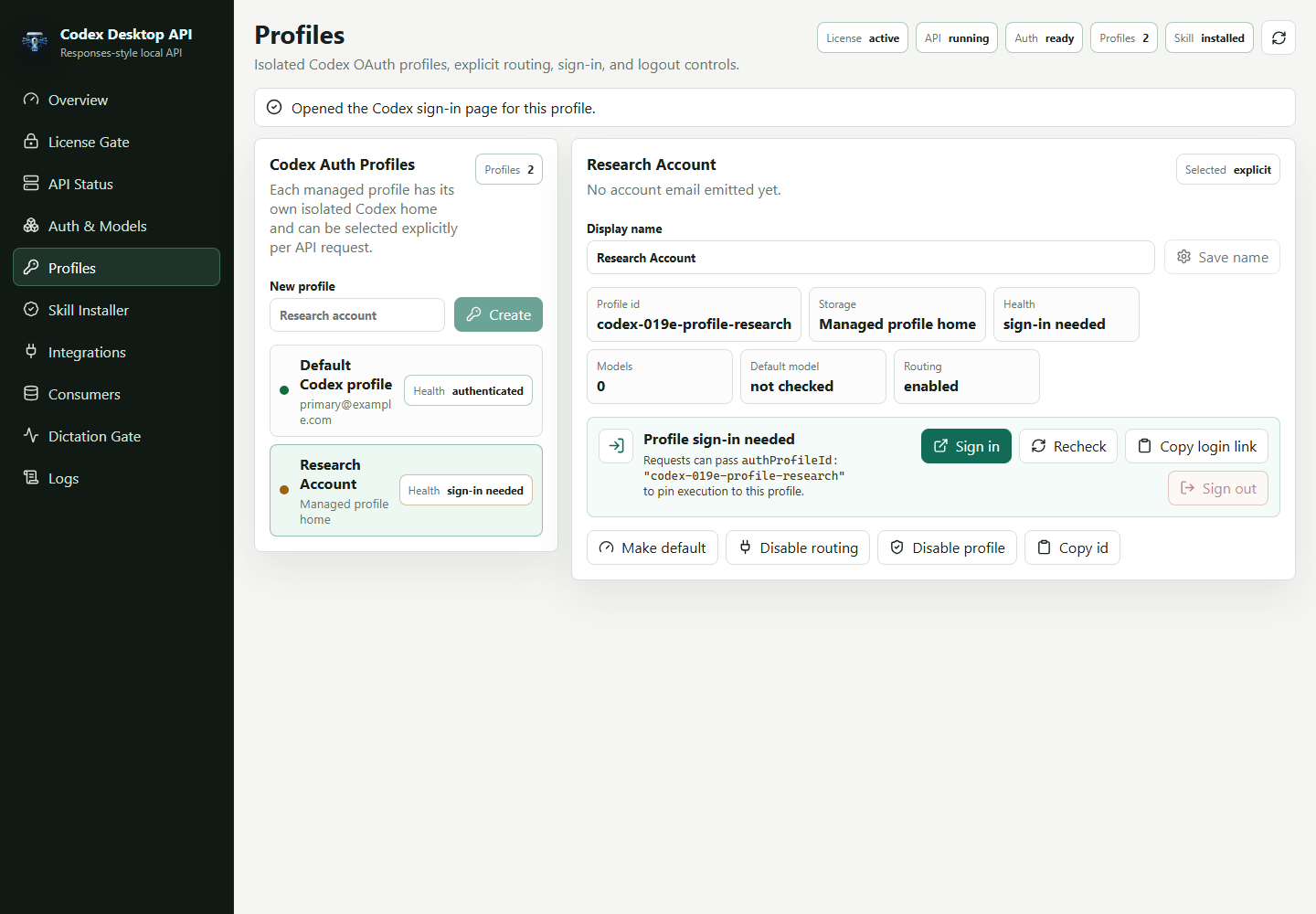
Pick the Codex OAuth profile that should execute each request.
Integrations use opaque profile ids instead of filesystem paths.
The app starts Codex login flows without exposing tokens.
How it works
The website handles purchase and delivery. The desktop app handles local readiness, license enforcement, Codex OAuth profiles, and the Responses-style loopback API your apps call.
Checkout stays on Stripe. Only the currently open cohort is purchasable, and the site records the grandfathered monthly basis for fulfillment.
Fulfillment provisions a license and sends recovery links, release metadata, updater-ready download details, and the onboarding path by email.
Codex auth remains local. Your apps send unary or streaming Responses-style calls to the desktop app's loopback API.
API proof
The core contract stays simple: health, readiness, models, auth profiles, unary responses, and SSE streaming. The profile selector is explicit and token-safe.
Choose a Codex OAuth profile per request, or omit the selector and let the local router use the default eligible profile.
The desktop app shows each profile's health, model count, routing state, and sign-in action without exposing tokens or raw auth files.
The included codexos-api skill teaches local Codex agents the endpoints, request shape, streaming route, and safety boundary.
The Windows app checks a signed release feed, prompts when a newer build is available, and keeps a manual Updates page for recovery.
const profiles = await client.authProfiles();
const authProfileId = profiles.defaultProfileId;

await client.createResponse(buildTextResponseRequest({
  prompt: "Ship the next local integration step.",
  model: "gpt-5.5",
  authProfileId
}));
Product evidence
The app surfaces managed profile homes, explicit request routing, per-profile sign-in, health state, and copyable authProfileId values so customers know exactly what API bridge they are buying.
See setup docsPick the Codex OAuth profile that should execute each request.
Integrations use opaque profile ids instead of filesystem paths.
The app starts Codex login flows without exposing tokens.
Sequential launch pricing
Founder 100 is the only cohort open right now. New subscriber pricing steps up only after each launch cohort fills.
Open now at $3/month
The earliest launch cohort with the lowest lifetime monthly price.
The current cohort is open at $3/month. After it fills, new subscribers move to $5/month; earlier subscribers keep their original monthly basis. Annual billing can use the same monthly basis when it opens.
Secure checkout by Stripe. License and download delivered after payment.
Price ladder
Open now at $3/month
Opens after the current cohort fills
Opens after the current cohort fills
Founders are rewarded for taking the earliest risk: when the public price moves up, existing members keep the monthly basis attached to their original cohort.
Privacy boundary
Codex Desktop API is designed around a loopback API on the buyer's machine. Payment, license state, email delivery, and gated download metadata live in the distribution service. ChatGPT/Codex authentication remains local to the customer device.
Read the onboarding docsSupport
Contact support for purchase recovery, license delivery issues, or setup questions. Do not send Codex tokens, cookies, browser storage, or license keys.
FAQ
No. The first launch path is local-first desktop distribution. Codex auth stays on the buyer's own computer.
Yes. The desktop app includes profile management and profile-scoped auth/model endpoints. Integrations can pass authProfileId for an explicit profile or omit it for default routing.
Yes. Only one launch cohort is open at a time: $3 for Founder 100 members, then $5 through Early 500, then $7 through Launch 1,000. The server records the purchased tier, monthly amount, and annual-grandfathering metadata for fulfillment and future billing operations.
The first launch provider is GitHub Releases behind the gated success and manage flow. Keygen Artifacts and R2 are represented behind the release provider abstraction for a future switch.
Yes after the first updater-capable Windows build is installed. The app checks the signed release feed on launch and periodically, shows a clear install prompt, and keeps a manual update check in the desktop Updates page.